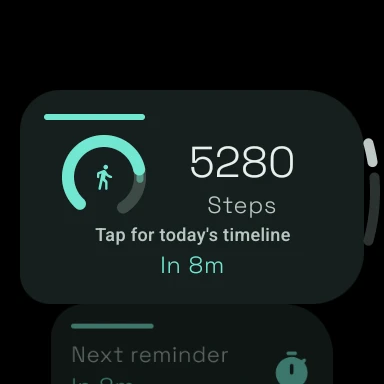
 On your wrist
Move More supports Android phones and compatible Wear OS watches. The watch can surface movement prompts and at-a-glance progress, while the paired phone provides the broader configuration, history, insights, and optional Health Connect context.
What a Wear OS watch adds
The main advantage is not a different health claim; it is delivery. A gentle wrist vibration is difficult to miss but does not require opening the phone in a meeting. The watch also makes daily steps and the current movement or sitting context visible without another app-search moment.
Receive a movement cue on a device already attached to you during the workday.
Check steps and movement context with less friction than unlocking the phone.
Keep settings and activity context aligned between the Android phone and watch.
Health Connect can be enabled on supported Android setups when you choose to grant approved permissions.
A wrist reminder is not automatically better for everyone. Some people find watch vibrations more interruptive than phone notifications. Others want the watch to work entirely independently of a phone. Choose based on where you are most likely to notice and act on the cue.
Three ways to get inactivity prompts on a Wear OS watch
| Option | Best for | Trade-off |
|---|---|---|
| Move More | Android + Wear OS users who want configurable reminder logic, daily patterns, and a paired phone-watch experience | It is a dedicated app rather than a built-in watch feature. |
| Wear Stand-up Inactivity Alert | Users who prioritize a watch-first inactivity tracker with step/frequency settings and a watch complication | The experience is more utility-focused and may be less centered on broader phone history. |
| Samsung Health inactivity alert | Galaxy Watch owners who want a simple manufacturer-provided prompt | Controls vary by watch model and software; Samsung documents a 50-minute inactivity prompt for supported settings. |
Read the full Wear OS stand-up reminder comparison for current official-source details and use-case recommendations.
Wear OS setup checklist
- Install Move More from Google Play on the supported Android phone and compatible watch.
- Confirm the watch is paired and connected to the same Android phone.
- Allow the notification, activity-recognition, and timing permissions the app explains.
- Set the reminder schedule and threshold on the phone first.
- Open Move More once on both devices so the latest settings can synchronize.
- Test one reminder during a normal work block before relying on it for the full week.
Wear OS versions, watch manufacturers, battery settings, Google Play services, and permission controls can affect delivery. A technically correct app configuration can still be delayed by aggressive background restrictions.
Choose the Wear OS companion when phone prompts are easy to miss and a brief wrist cue fits your meetings, work environment, and notification tolerance.
Common questions
Frequently asked questions
Does Move More work on Galaxy Watch?
Can I use the app without the phone?
Why did a watch reminder not arrive?
Is Samsung Health’s inactivity alert enough?
Sources and verification
We checked the official product pages and public-health sources below on 2026-08-18. Features can change, so confirm the latest details before choosing an app.
- Move More: Stand Up Reminder — Google Play listingGoogle Play / Vitality Trails
- Wear Stand-up Inactivity Alert — Google Play listingGoogle Play / DYNA Logix
- Manage notifications and inactivity alerts in Samsung HealthSamsung Support
- Health Connect overviewAndroid Developers
Written and checked by Harel Herer, the independent developer of Move More. Comparisons use public product information and disclose where Move More is the better—or weaker—fit.
Read the editorial policy